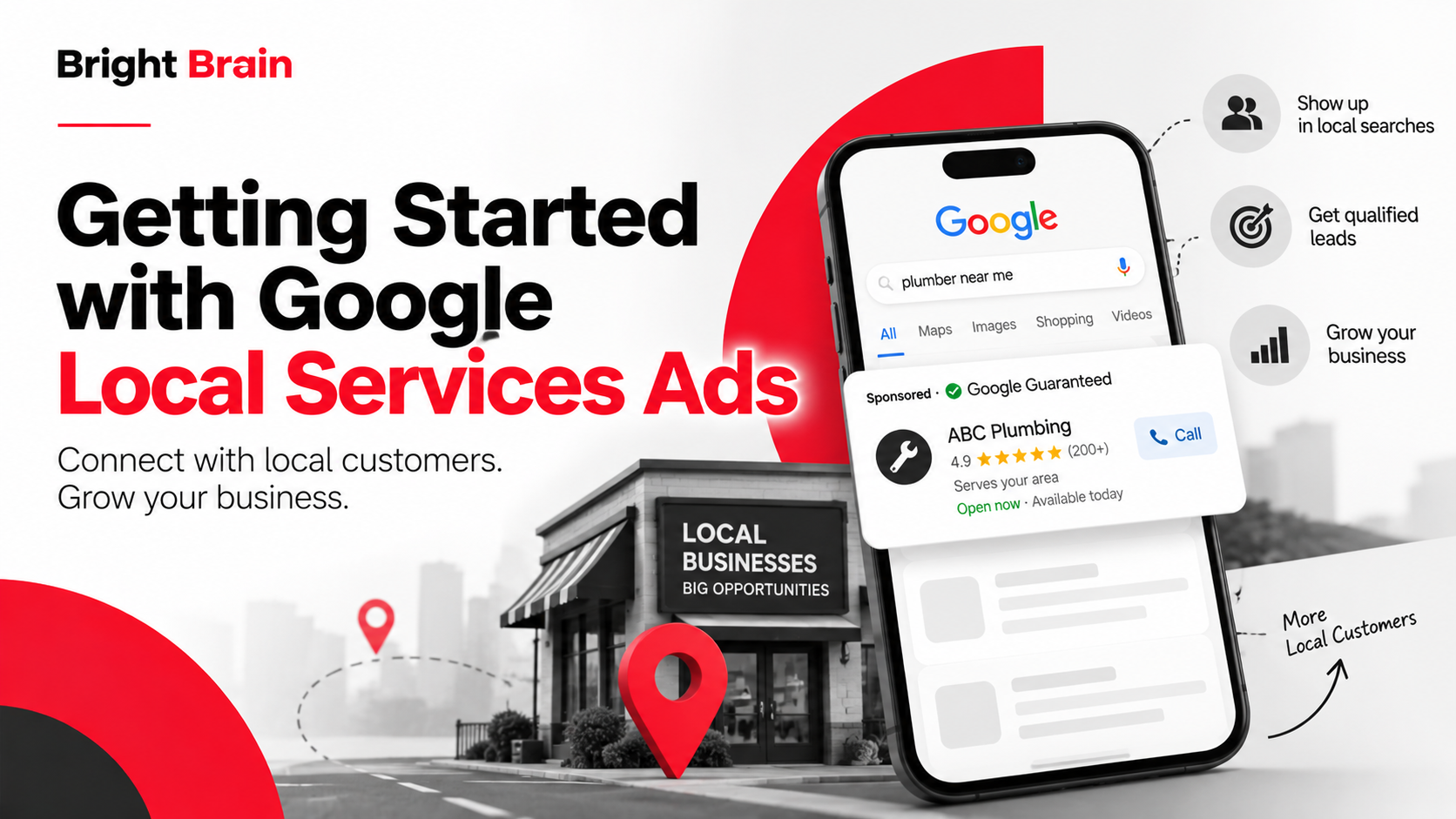
Local Service Ads let home service and professional businesses appear at the very top of Google search results, above organic listings and standard ads, and charge only when a customer calls or messages directly. Setting one up means verifying your business, linking your Google Business Profile, and building a realistic budget. Most accounts start receiving calls within the first two weeks.
Most business owners try Google Ads before they try local service ads, and that is usually the wrong order. Search campaigns send clicks. This format sends phone calls from people who typed “near me” because they need help today. If you run a plumbing outfit, a salon, a law practice, or any business that serves a defined area, this is the format built for you, not a repurposed one.
This guide walks through what local service ads are, what Google checks before approving your account, how to set one up correctly the first time, and how to connect it to a properly optimised Google Business Profile so both channels work together instead of competing for budget.
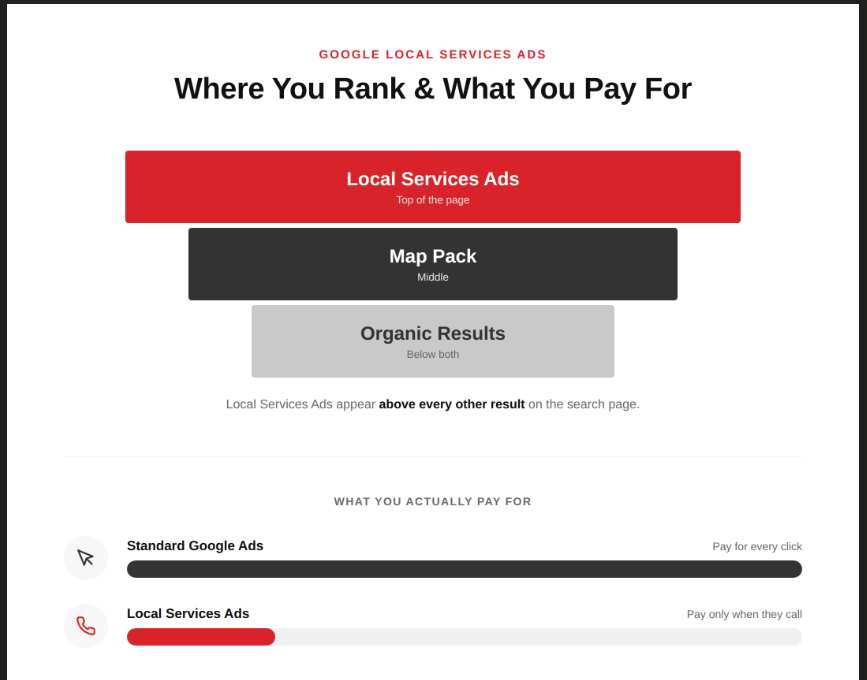
Local service ads are Google’s pay-per-lead format for service businesses. Unlike ordinary Google business advertising, where you pay per click regardless of intent, this format charges only when someone calls, messages, or books through the ad itself. That single difference changes how you should think about budget, because every rupee is tied to an actual contact attempt, not a visit that might bounce.
The listings appear above the map pack and above every organic result, which is prime real estate for anyone trying to promote business on Google in a competitive local market. Each listing shows your business name, star rating, years in operation, and a verification badge once your screening is complete.
Field observation from client accounts: businesses that treat this channel as separate from their organic presence consistently underperform businesses that align the two. The format rewards trust signals your Google Business Profile already carries, which is exactly why Google Business advertising and profile work now sit under the same strategy.
Next, before you can collect a single lead, Google needs to confirm you are who you say you are.
Direct answer: Google verifies your business identity, licensing, insurance, and background history before any local service ads go live, and this screening typically takes between three days and four weeks depending on your category and city.
In late 2025, Google consolidated its old Google Guaranteed and Google Screened badges into a single Google Verified badge, and the associated money-back guarantee program was discontinued. You still need a business licence where applicable, active liability insurance, and a background check for the owner and, in many trades, every field worker on the account.
Businesses skip this step and assume it happens automatically. It does not. What actually works: gathering your insurance certificate, licence documents, and worker details before you start the application, which can shave two to three weeks off approval time.
A three-star minimum rating on your Google Business Profile is also required to stay eligible, which is one more reason Google My Business optimization cannot be an afterthought once your ads go live. Businesses that treat seo google my business work as a one-time task tend to fall below that threshold within a year, and a low rating can quietly disqualify otherwise strong Google My Business ads from ever displaying. If you have not yet done so, add your business to Google before this stage, since verification cannot begin on a listing that does not exist.
Once verification is underway, the next step is building the account itself.
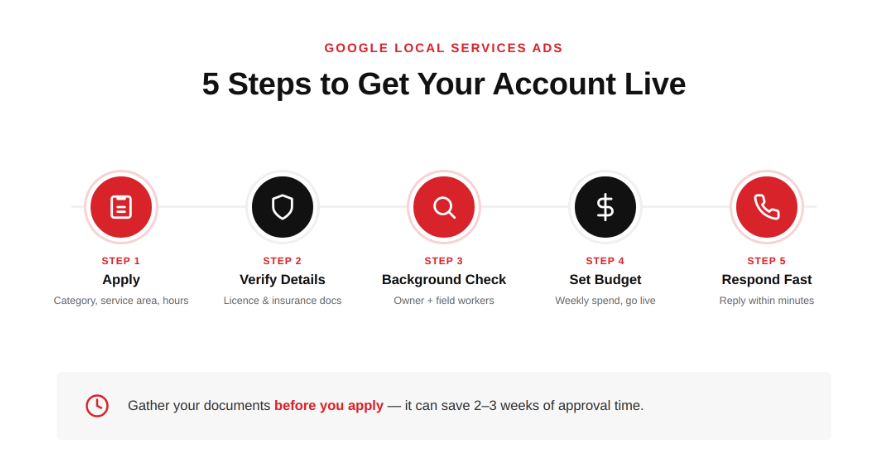
Start at the Local Services Ads sign-up page and select your business category. Google will ask for your service area, either by zip code radius or named region, and your working hours.
From there, you submit business details for review: legal name, address, phone number, and the licence or insurance documents relevant to your trade. This is also the point where many owners realise they never got around to proper Google Business advertising groundwork, because Google cross-checks the details you submit against your public listing.
Once the background check clears, you set a weekly budget, choose your lead preferences, such as which job types or service radius you want to prioritise, and your account goes live. From that point, local service ads begin surfacing you for matching searches almost immediately, though ranking position takes a few weeks to stabilise as Google gathers response-time and review data. Running Google Local Ads alongside your existing search campaigns, rather than instead of them, tends to protect overall visibility while the new account settles.
Respond to every lead within minutes wherever possible. Response speed is one of the strongest ranking signals in this format, arguably stronger than budget size. Owners who treat this step as basic Google Business advertising housekeeping, rather than a one-time form, tend to promote business on Google far more consistently once the account is live.
Your Local Services Ads account and your Google Business Profile are not the same product, but Google treats them as connected trust signals. If you have not yet claimed a listing, add your business to Google before you touch the ads dashboard, because verification for both systems often overlaps.
A profile with accurate categories, current photos, and a steady stream of reviews feeds directly into how your listings are ranked and displayed. Businesses running Google My Business ads alongside a thin, outdated profile tend to see lower badge visibility and slower lead flow, even with a healthy budget.
This is also where seo google my business work pays off twice. The same citations, keywords, and review responses that help your profile rank organically also strengthen the trust signals Google uses to rank your paid local service ads. Owners who have not yet claimed a listing should add your business to Google as the very first task on their setup checklist, since nothing else in this process works without it.
Treat the two as one connected system, reviewed on the same weekly schedule, rather than separate projects run by separate people. Businesses that run Google Local Ads without ongoing Google My Business optimization on the profile side tend to plateau faster than businesses that manage both together.
Direct answer: most service businesses should start with a weekly budget that covers 15 to 25 leads, then adjust based on how many of those leads convert to booked jobs, not on impressions or clicks.
Because you pay per lead rather than per click, the real budgeting question is not “what can I afford to spend” but “what is a booked job worth to me.” A plumbing business earning ₹8,000 per average job can comfortably pay ₹800 to ₹1,200 per qualified lead. A one-time home renovation business with a much higher ticket size can afford considerably more.
Bright Brain, a Google Elevator Partner recognised as one of 15 agencies selected from over 7,000 across India, builds this math before touching a single campaign, because a budget set on guesswork almost always gets adjusted twice, once when it runs out too fast and once when leads stop converting. The same discipline applies whether the account runs local service ads alone or sits inside a wider Google local ads and search strategy.
Track cost per booked job weekly, not monthly. This format moves fast enough that a monthly review often means three weeks of wasted spend before anyone notices the pattern, which is a costly way to promote business on Google if nobody catches it early.
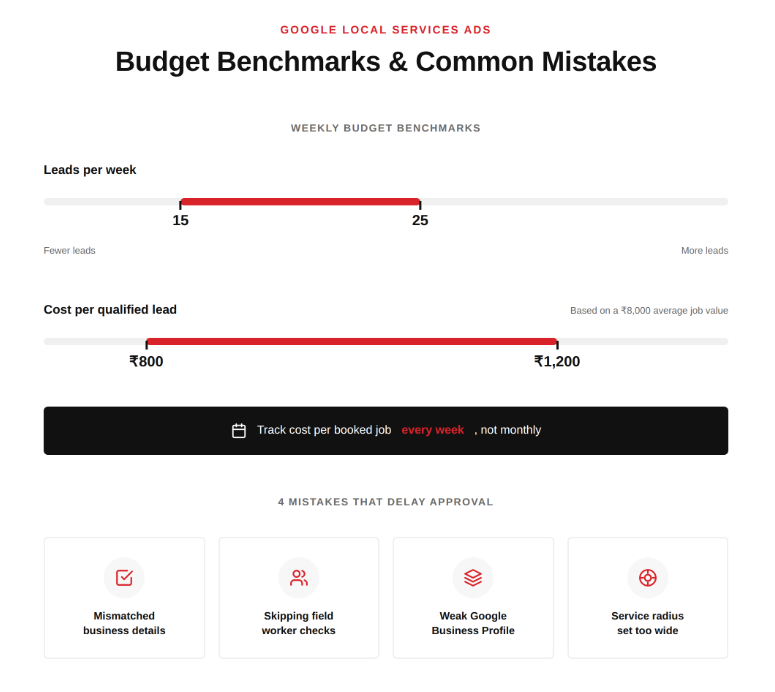
Most delays are self-inflicted. Owners submit mismatched business names between their licence, their Google Business Profile, and their ad account, and verification stalls until every document agrees.
Skipping field worker background checks is another frequent mistake. If your team visits customer homes, every worker listed needs clearance, and adding them after the fact restarts part of the review.
A weak or thin Google Business Profile is the quiet killer. Businesses spend weeks chasing local service ads approval while their underlying profile has three reviews and no photos, which caps how well the ads perform even after approval clears. Fixing Google My Business optimization before you apply removes an entire category of post-launch problems, and it costs nothing but time.
Finally, some businesses set their service radius too wide, hoping for more volume, and end up paying for leads outside a realistic drive time. Weak Google My Business optimization compounds this problem, since a thin profile ranks poorly across every radius rather than just the far edges of it. Narrow the radius first, and treat Google Local Ads settings and profile fixes as one review, not two separate chores. You can always expand once response times and conversion data prove you can handle the extra distance. Businesses that skipped this step and tried to add your business to Google after launching ads usually redo both processes within a month.
Approval is the start, not the finish. This channel rewards businesses that stay active:
Ask every satisfied customer for a review within a day of job completion, while the experience is still fresh. Reviews compound. A business with 40 recent, specific reviews will consistently outrank a business with 200 old, generic ones, and that gap shows up directly in your Google My Business ads placement.
Revisit your service categories and radius every quarter. Search behaviour shifts with seasons, and a category that underperformed in spring can become your strongest lead source by autumn. Strong Google My Business ads performance and steady seo google my business work tend to move together, since Google draws on many of the same signals for both. Pair that with ongoing Google Local Ads work and organic groundwork, and the two channels start reinforcing each other instead of splitting a limited budget. That combination is usually the fastest way to promote business on Google without inflating cost per lead.
For businesses that would rather hand the weekly monitoring to a specialist, Bright Brain manages Google My Business ads and lead-based campaigns alongside Google Business Profile optimisation, so response times, budgets, and review requests are handled as one coordinated system instead of three disconnected tasks. Ongoing seo google my business support keeps the profile side of that system from quietly slipping.
Local service ads work when the fundamentals are handled in the right order: verification first, a properly optimised Google Business Profile second, and a budget built around booked jobs rather than guesswork. Skip any one of those and approval slows down or leads arrive without converting.
None of this needs to feel overwhelming. Businesses that treat their ads account and their profile as one connected system tend to see steady call volume within weeks, not months. If you would rather have a specialist handle setup, budgeting, and ongoing optimisation while you focus on the jobs themselves, Bright Brain’s team works on lead generation and seo google my business efforts every day, helping you promote your business on Google without the trial and error. Book a Consultation Call to review your account. Learn More about how a coordinated setup turns local search into a dependable source of booked work.
Cost per lead varies by trade and city, typically ranging from a few hundred to a few thousand rupees. Emergency services and high-ticket trades such as renovation or legal work usually cost more per lead than routine maintenance categories, since competition and job value are both higher.
Verification typically takes three days to four weeks, depending on your business category and whether field worker background checks are needed. Having your licence, insurance, and worker details ready before you apply, alongside solid Google Business advertising basics, is the fastest way to shorten this timeline.
Yes. A public, verified Google Business Profile is required, and Google treats the two as connected trust signals. Businesses without a claimed profile should add your business to Google first, then begin the ads application once that listing is live.
Google uses automated systems to assess leads and may automatically credit charged leads later identified as low quality. Google no longer supports credits for job types or geographic areas you do not serve. Where lead credits are available, they are usually applied within 30 days. Use the Lead Feedback Survey to report lead quality and keep your service areas and job types accurate; eligibility varies by category and region.
Google retired the separate Guaranteed and Screened badges in late 2025 and replaced them with a single Google Verified badge. The underlying verification, background checks, licensing, and insurance still apply, but the standalone money-back guarantee program was discontinued.
Solo operators with time to respond quickly can manage a small account themselves. Businesses juggling multiple job categories or cities, or running parallel Google My Business optimization work, usually see better cost per booked job when a specialist handles bidding and review requests together.